Beyond Flows; Why Visual Automation Needs a New Paradigm
title: “Beyond Flows: Why Visual Automation Needs a New Paradigm” —
Beyond Flows: Why Visual Automation Needs a New Paradigm
Introduction
The no-code movement promised to democratize software development. Tools like Make (formerly Integromat), Zapier, Pipedream, n8n, and countless others let anyone build automations by connecting visual blocks. No programming required. Just drag, drop, connect, and watch data flow between your apps.
And it works. Remarkably well, actually.
Need to send a Slack message when a new row appears in Google Sheets? Done in five minutes. Want to automatically create Notion pages from form submissions? A few clicks. Sync your CRM with your email marketing platform? There’s a pre-built integration for that.
These tools have spawned an entire ecosystem: integrations (or “connections” or “plugins”), pre-built templates, marketplaces of automations. Millions of people who would never write a line of code are now building workflows that genuinely automate their work. The barrier to entry has collapsed.
But there’s a catch. And if you’ve spent enough time in these tools, you’ve probably hit it.
Why No-Code Works So Well (At First)
The appeal is obvious. No-code tools provide:
Instant gratification. You see results immediately. Connect two apps, run the workflow, watch data move. The feedback loop is seconds, not hours.
Visual clarity. The flow of data is literally visible. You can trace the path from trigger to action, see where transformations happen, understand the logic at a glance. For many workflows, this visual representation is genuinely clearer than equivalent code.
Pre-built integrations. Someone else already figured out OAuth flows, API pagination, rate limiting, and error handling for hundreds of popular services. You just click “connect” and authenticate.
Low-risk experimentation. Building the wrong thing costs minutes, not days. You can prototype, test, iterate, and pivot without significant investment.
For simple to moderately complex automations, no-code tools are genuinely the right choice. They’re faster, more maintainable, and more accessible than writing custom code.
The problem is when “moderately complex” isn’t enough.
Where No-Code Breaks Down
Here’s the pattern: you start with a simple automation. It works beautifully. Then requirements evolve. You need to do slightly more. And suddenly you’re fighting the tool.
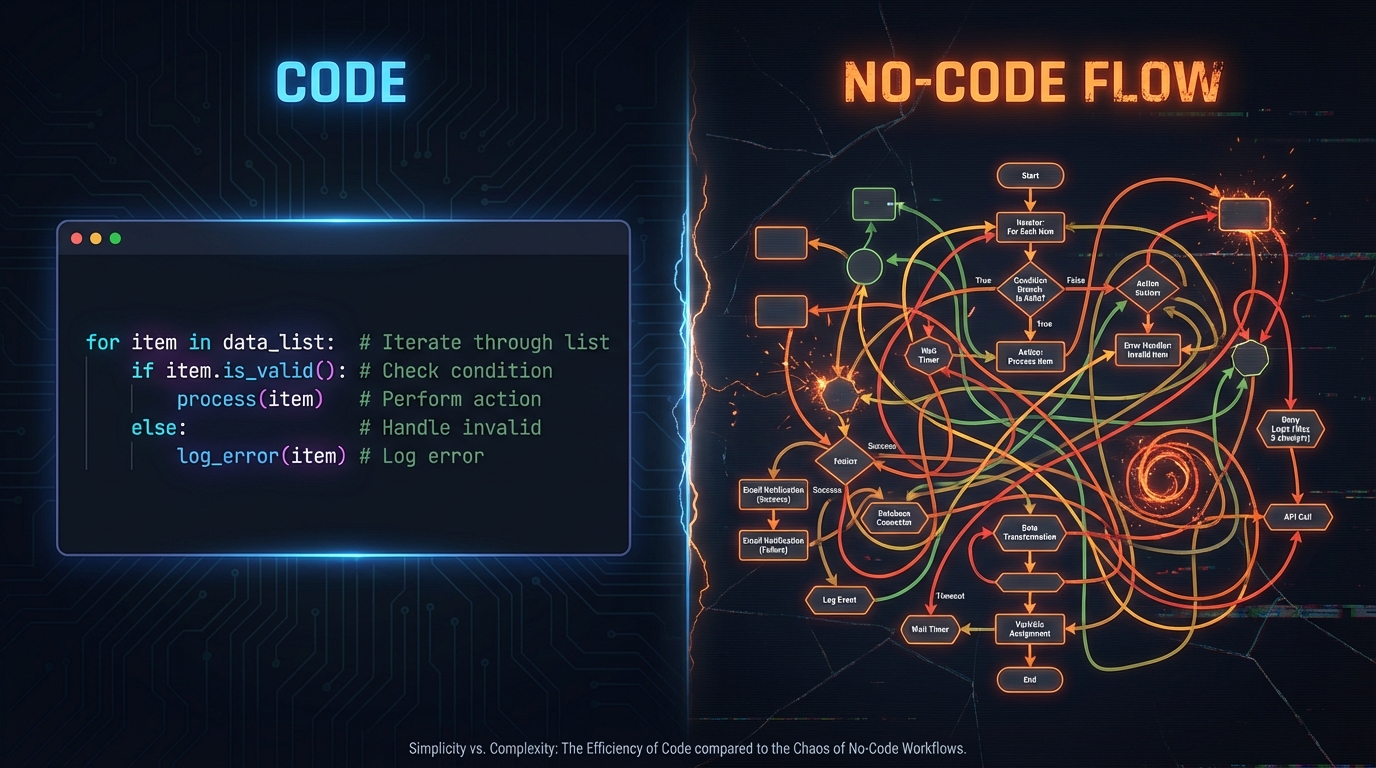
The Data Transformation Problem
Imagine you have a spreadsheet with sales data. You want to calculate a rolling 7-day average, flag outliers, and push the results to a dashboard. In Python with pandas, this is a few lines of code:
df['rolling_avg'] = df['sales'].rolling(7).mean()
df['rolling_std'] = df['sales'].rolling(7).std()
df['is_outlier'] = (df['sales'] - df['rolling_avg']).abs() > 2 * df['rolling_std']
In a no-code tool? You’ll spend hours wrestling with formula nodes, iterators, and aggregators, if it’s even possible. Most no-code platforms offer basic operations (sum, average, filter) but fall apart when you need statistical functions, custom aggregations, or anything that operates on the shape of data rather than individual values.
The Library Problem
What if you need to:
- Parse a PDF and extract structured data
- Generate a QR code
- Compress an image before uploading
- Call a machine learning model
- Handle complex authentication flows (OAuth2, API signing)
These tasks have mature Python libraries (pypdf, qrcode, Pillow, scikit-learn, requests-oauthlib). In code, you import the library and call a function. In no-code tools, you’re limited to whatever integrations exist, and if your use case isn’t covered, you’re stuck.
Some platforms offer “code nodes” where you can write Python or JavaScript, but these are often sandboxed environments with limited library support, memory constraints, and execution timeouts. The moment you need a “complicated lib,” the visual paradigm breaks.
The Iteration Problem
Perhaps the most frustrating limitation: operating on collections.
“For each row in this spreadsheet, call an API, process the response, and update a database record.”
This is trivial in any programming language. It’s a loop. But in visual no-code tools, iteration is awkward at best. You might find an “iterator” node that processes items one at a time, but:
- Error handling becomes a nightmare (what happens when one item fails?)
- Rate limiting requires manual workarounds
- State management across iterations is painful
- Debugging is nearly impossible when you can’t see what happened on row 47
The visual metaphor that makes simple flows clear becomes a liability when you need to express “do this thing 1,000 times with variations.”
The Logic Problem
Business logic is messy. Real-world requirements involve:
- Nested conditionals (“if this AND that, unless the other thing, except on weekends”)
- Stateful processing (“remember what we did last time”)
- Complex branching (“route to different workflows based on 15 different criteria”)
- Dynamic behavior (“the transformation depends on configuration that changes”)
No-code tools handle simple if/else branches reasonably well. But as logic complexity grows, the visual canvas becomes a tangled mess of nodes and connections. What would be a clear 20-line function becomes an unreadable spaghetti diagram.
The Core Insight: Flows Are the Problem, Not Visual Programming
This isn’t a criticism of no-code tools. They’re excellent for their intended purpose. The problem is that every single one of them made the same design choice: the flow paradigm. Nodes connected by arrows. Data moves from left to right, top to bottom. Trigger → Transform → Action.
And that paradigm has a limit.
But here’s the key insight: the limit isn’t inherent to visual programming. It’s inherent to flows.
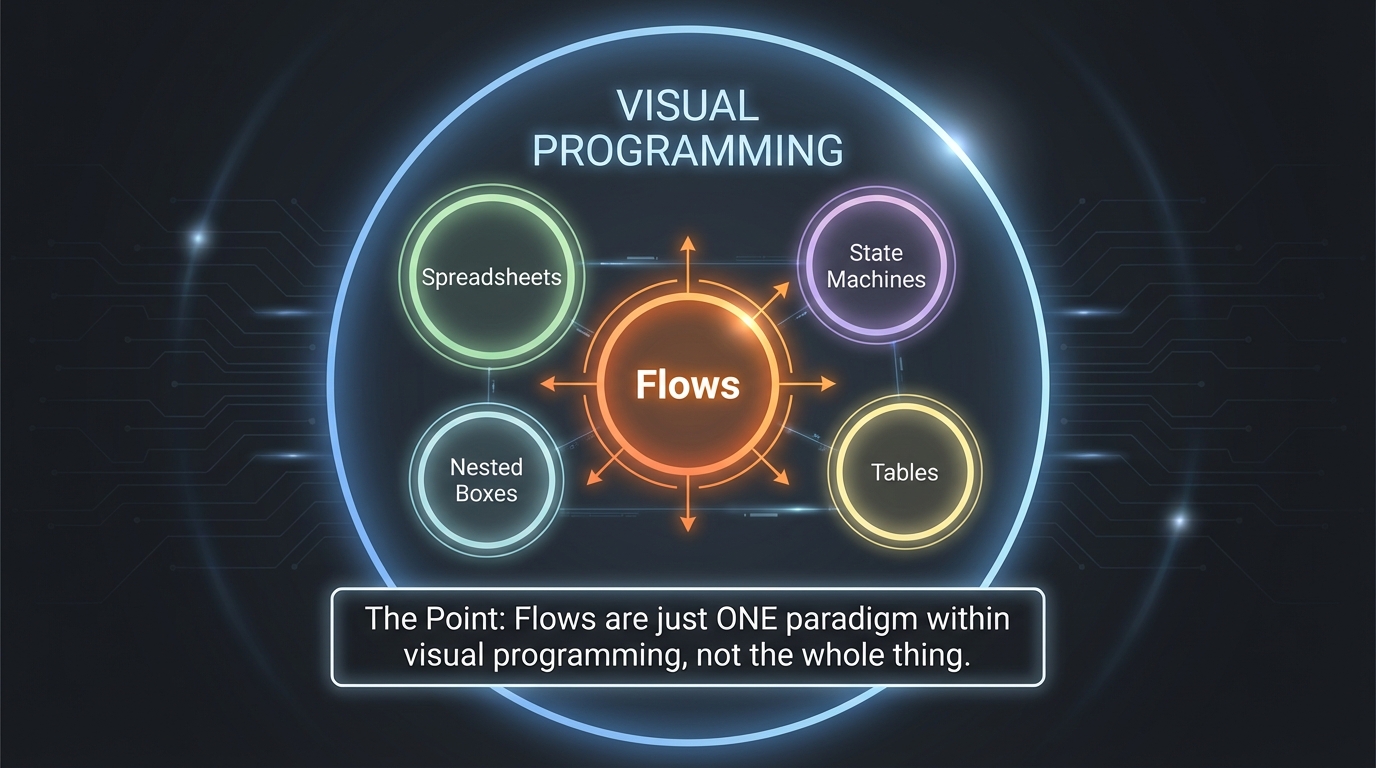
This distinction matters enormously. We’ve been conflating “no-code tools have limitations” with “visual programming has limitations.” They’re not the same thing. Flows are just one visual representation, and a fairly constrained one. The question isn’t “how do we work around the limitations?” It’s “why are we all building the same thing?”
Rethinking the Paradigm
Beyond Flows: Multiple Ways to Represent Logic
Flows are just one way to visually represent computation. There are others:
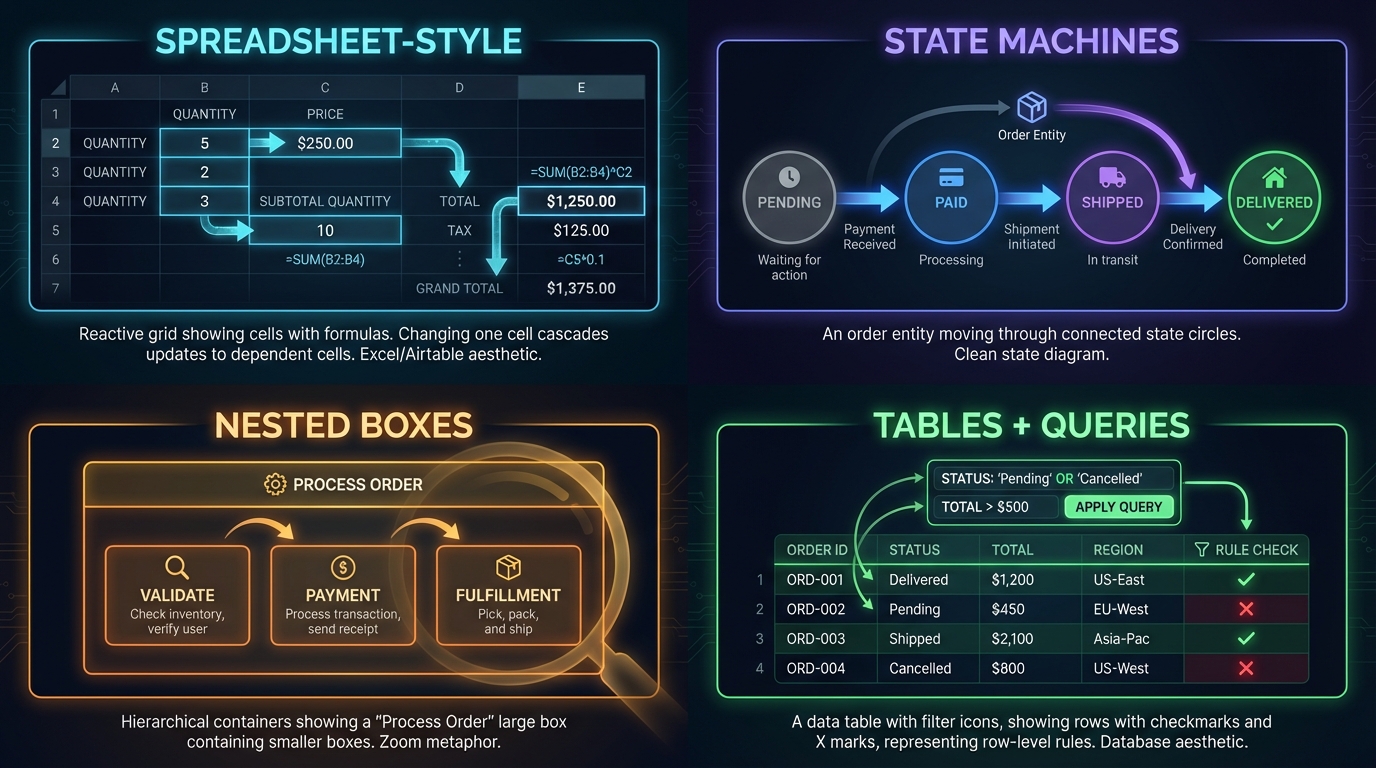
Spreadsheet-style (reactive cells). Excel isn’t a flow; it’s a grid of cells that react to each other. Change one value, dependent cells update automatically. This paradigm handles complex calculations elegantly: rolling averages, conditional aggregations, cross-references. Tools like Airtable and Coda have brought this paradigm to databases with great success, but it’s rarely integrated into automation flows. Why not combine them?
State machines. Some logic isn’t about data flowing through steps; it’s about an entity moving through states. An order is “pending,” then “paid,” then “shipped,” then “delivered.” Each state has rules about what can happen next. State machine representations make this crystal clear; flow diagrams turn it into spaghetti.
Nested boxes (hierarchical composition). Instead of a flat canvas of nodes, imagine containers that hold other containers. A “process customer order” box contains sub-boxes for validation, payment, fulfillment. You zoom in to see detail, zoom out to see the big picture. This is how we naturally organize complex systems.
Tables and queries. Sometimes the right representation is just: “for each row where X, do Y.” A table view with filter conditions and row-level actions. No arrows, no nodes: just data and rules.
The insight is that different parts of the same automation might be best expressed in different paradigms. The trigger logic might be a state machine. The data transformation might be spreadsheet-style. The routing might be a flow. The iteration might be a table.
Why force everything into one representation?
Natural Language as Program
Here’s where AI changes everything.
Natural language is itself a representation of logic. “Calculate the 7-day rolling average and flag outliers” is a program. It’s precise enough for a human to implement. And now, it’s precise enough for an LLM to interpret and generate working code.
What if the visual representation of your automation included natural language blocks? Not as comments. Not as documentation. As the actual program.
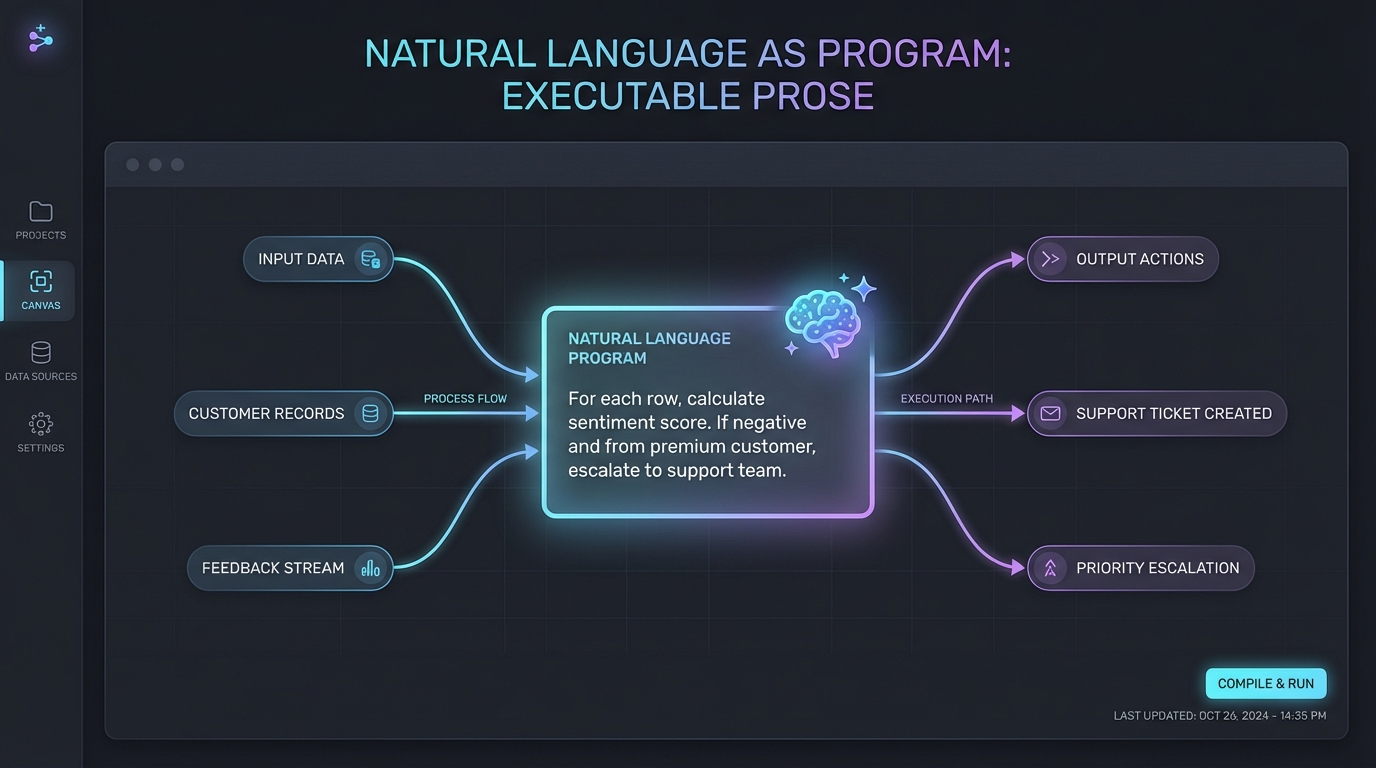
Imagine a node that simply says: “For each row, calculate sentiment score using the comment text. If negative and from a premium customer, escalate.” That’s your specification, and the system generates the implementation automatically, keeping both in sync. You edit the prose; the code follows.
This isn’t science fiction. We’re already seeing early versions: AI coding assistants that turn prose into code, chat interfaces that query and modify databases, agents that execute multi-step tasks from plain instructions. But these are chat interfaces or code generators, not visual environments you can inspect and compose.
The challenges are real: LLMs can misinterpret edge cases, and keeping prose and implementation perfectly synchronized remains an active problem. But the direction is clear. The missing piece is treating natural language as a first-class visual representation you can see, edit, arrange, and debug alongside flows and tables.
The power is in combining representations. A flow that contains a natural language block that references a spreadsheet-style calculation. Each part expressed in the paradigm that fits it best.
AI-Generated Visual Representations
Here’s another angle: what if the visual representation itself was generated?
Consider a concrete workflow: you have a code block that processes customer data (filtering, aggregating, transforming). Today, this appears as a generic “code” node with an icon. But what if the system could take that code, send it to a model like Gemini with: “Analyze what this code does. Think about visual representations that would communicate its logic. Generate an infographic that explains this transformation.”
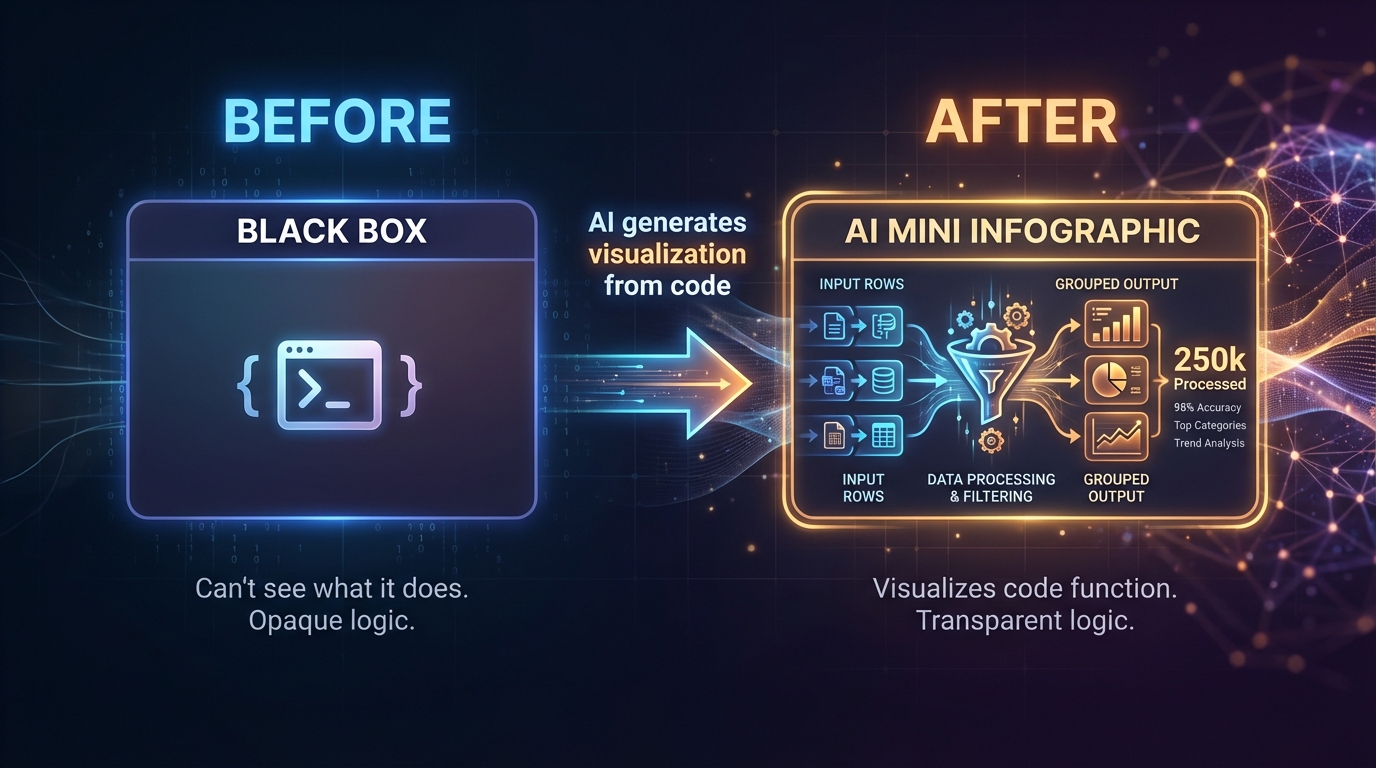
The result: instead of a black-box node, you see a generated diagram showing data flowing through filters, splitting into categories, aggregating into totals. A data aggregation step renders as a funnel chart. A filtering operation shows a before/after comparison. A branching decision becomes a visual decision tree. Each visualization is bespoke, tailored to what that specific code actually does.
The representation wouldn’t be a generic flow icon; it would be a custom visualization that actually communicates the logic. And it would regenerate every time the code changes.
This flips the paradigm entirely. Instead of forcing your thinking into pre-defined visual primitives (nodes, arrows, branches), the tool generates whatever representation best explains your specific automation. The visual language becomes as flexible as the underlying logic.
Malleable Representation
Here’s the deeper principle: the representation should adapt to the task, not the other way around.
When you’re designing the high-level structure, you want to see flows or state machines. When you’re debugging a data transformation, you want to see the data, maybe as a table, maybe as a diff. When you’re tweaking business logic, you want to edit natural language. When you’re optimizing performance, you want to see execution traces.
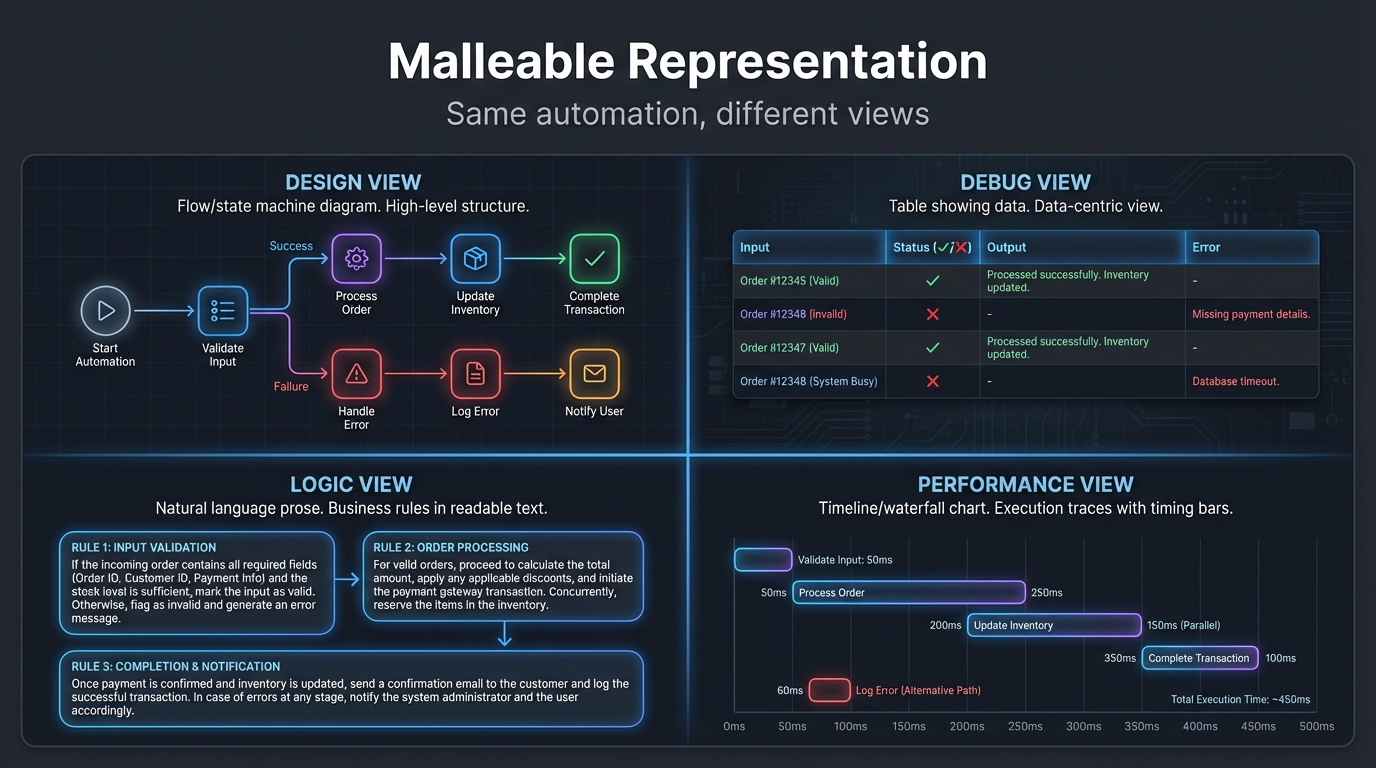
Same underlying automation. Different views. The tool morphs to match your intent.
This is how experts actually work. A musician reads sheet music, but also listens, also feels the rhythm physically. A programmer reads code, but also draws diagrams, also traces execution mentally. The representation shifts fluidly based on what they’re trying to understand or change.
No-code tools today give you one view. Take it or leave it. But there’s no law of nature that says it has to be this way.
What This Could Look Like
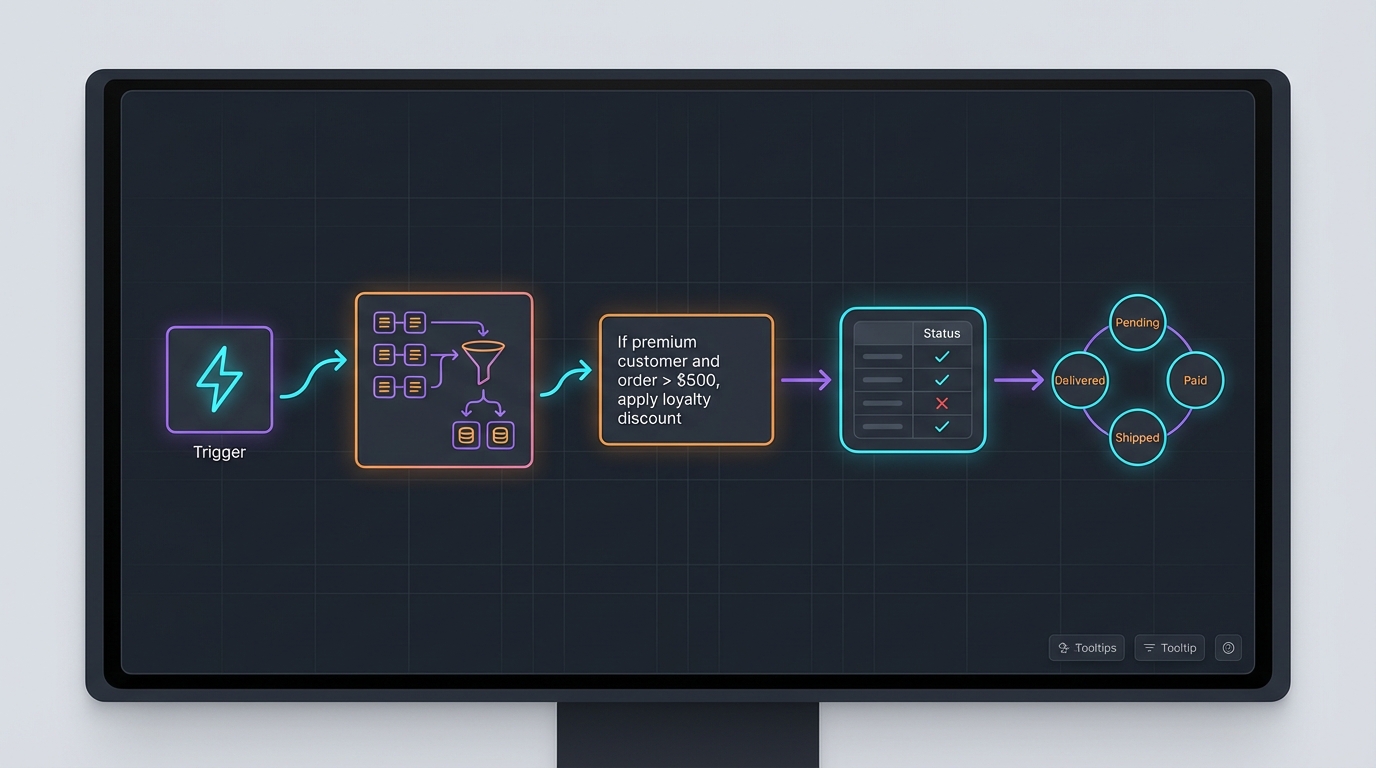
Picture a canvas where the flow paradigm is your backbone, the familiar trigger-to-action structure that works well for orchestration. But within that flow, different nodes speak different visual languages:
-
A data transformation node that’s actually a code block, but rendered as an AI-generated infographic showing exactly how your data morphs: inputs on the left, outputs on the right, the transformation visualized as a diagram that regenerates when you edit the code.
-
A batch processing node displayed as a table: rows of data with columns for input, status, and output. You see which rows succeeded, which failed, click to expand error details. No abstract “iterator” icon; just the data itself.
-
A business logic node that’s simply prose: “If the customer is premium and the order exceeds $500, apply the loyalty discount and route to priority fulfillment.” That text is the program. Edit the words, the behavior changes.
-
A state machine node for entities that move through states (an order that goes from “pending” to “paid” to “shipped”), visualized as states and transitions rather than a linear flow.
The main flow gives you the big picture. Each node lets you zoom into the representation that fits its purpose. Same automation, multiple paradigms, unified canvas.
Not five different tools stitched together with exports: one environment where representations mix fluidly based on what each part of your automation actually needs.
A Call to Builders
This post isn’t advice for users on how to cope with limitations. It’s a challenge to the people building these tools.
The no-code space has been remarkably uniform. Make, Zapier, n8n, Pipedream: they look different, but they’re all flows. They’re all competing on integrations, pricing, and execution limits. They’re not competing on paradigm.
That’s an opportunity.
The moment is right. AI has collapsed the cost of building software. A small team, or even a solo developer, can now prototype new interaction models that would have taken years before. The tools to build tools have never been more accessible.
The demand is real. Millions of people hit the wall every day. They’re not asking for slightly better flows. They’re asking to do things that flows can’t elegantly express.
The ideas exist. Researchers have explored alternative visual programming paradigms for decades. Spreadsheet languages. Constraint systems. Dataflow with feedback. Programming by demonstration. These aren’t speculative; they’re proven concepts waiting to be combined and productized.
What’s missing is someone willing to break from the flow consensus and build something genuinely different.
Not a better Zapier. A different kind of thing.
The no-code movement delivered on its promise: it made automation accessible to everyone. But accessible doesn’t mean complete. The limits we’ve hit aren’t the limits of visual programming; they’re the limits of flows. And flows are just one paradigm among many.
Somewhere out there is a canvas where a flow contains a table contains prose contains generated diagrams, each representation chosen for what it expresses best. That tool doesn’t exist yet. Someone should build it.
References
No-code platforms mentioned:
- Make (Integromat): Visual workflow automation
- Zapier: App integration platform
- Pipedream: Developer-focused workflow automation with code support
- n8n: Open-source workflow automation
Spreadsheet-paradigm tools:
- Airtable: Database with spreadsheet interface and automations
- Coda: Documents with reactive tables and formulas
Alternative visual programming paradigms:
- LabVIEW: Dataflow programming for engineering
- Max/MSP: Visual programming for audio/media
- Unreal Blueprints: Visual scripting in game development
- Ink & Switch: Research on malleable software and end-user programming
AI image generation:
- Google Imagen: Text-to-image generation capable of infographics and diagrams
- Gemini: Multimodal AI with native image generation