Can AI Streamline 2D Character Animation?
A decade ago, producing an animated educational video required a studio—animators, illustrators, editors, sound engineers, and a budget to match. Today, a single person with a laptop and a Creative Cloud subscription can produce content that rivals small production houses. The democratization of creative tools has birthed a new generation of one-person studios: creators who research, write, illustrate, animate, edit, and publish entirely on their own.
Cogito is one of these creators. His historical documentaries feature hand-illustrated 2D characters, period-accurate backgrounds, and narration that’s both scholarly and accessible. What makes him valuable to study isn’t just the quality of his work—it’s his transparency. In a detailed workflow breakdown, he documents every step of his process: from weeks of academic research to the frustrations of keyframing in After Effects. He shows what tools he uses, where he struggles, and how long each phase actually takes.
This transparency reveals an interesting tension: the creative bottlenecks in 2D animation aren’t in the ideas—they’re in the execution. The research and writing phases, while time-consuming, benefit from human judgment and perspective. But storyboarding, illustration, animation, and audio production? These are where repetitive mechanical work dominates.
This article focuses specifically on these visual production phases: storyboarding, character illustration, animation, audio synchronization, and motion design. For each, I’ll show what dedicated AI tools already exist and how they could transform the workflow from manual production to human-guided curation.
The Current Workflow
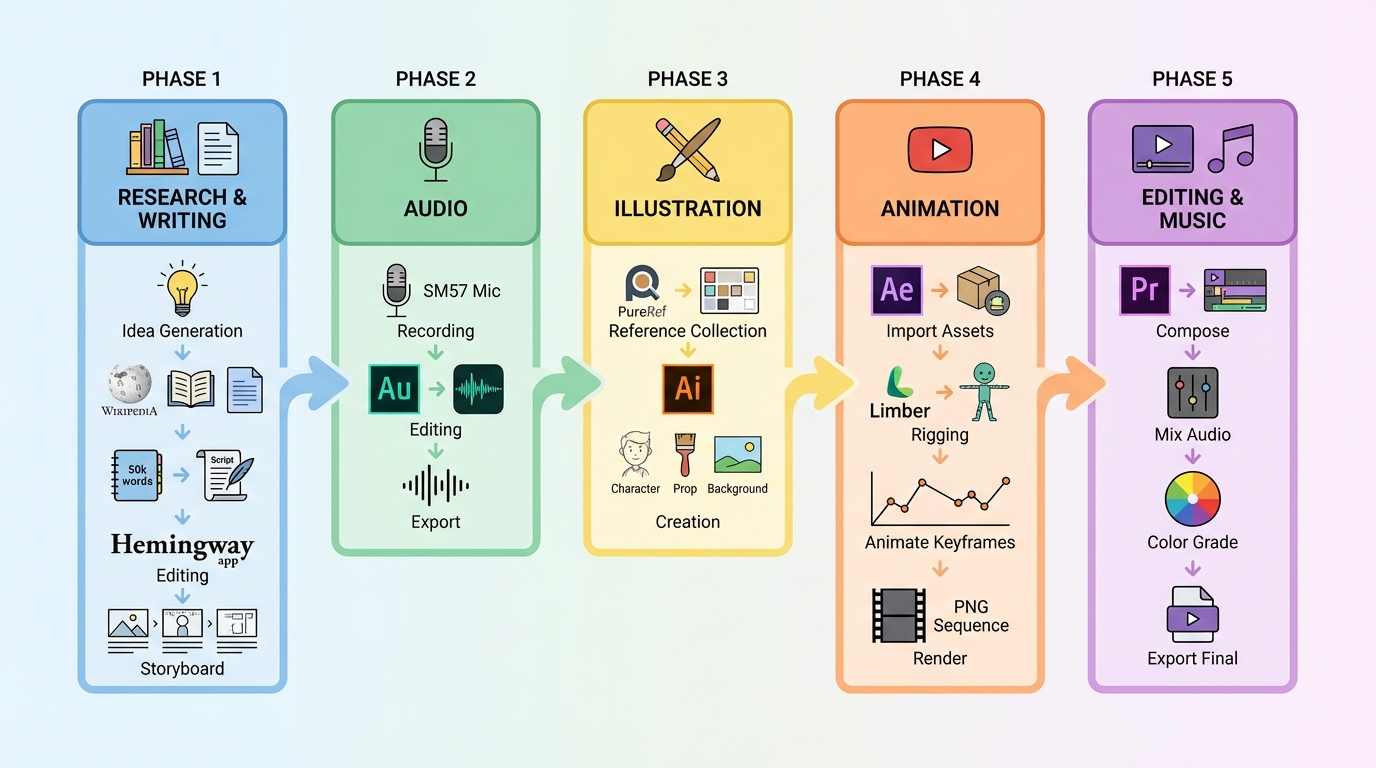
Based on Cogito’s breakdown, the pipeline flows through distinct phases: research and writing produce a script, which gets storyboarded in Google Docs and Storyboarder. Audio is recorded on a Shure SM57 and cleaned in Adobe Audition. Characters, props, and backgrounds are illustrated in Adobe Illustrator as vector graphics. These assets get rigged and keyframed in After Effects with plugins like Limber, rendered as PNG sequences. Finally, everything is assembled in Premiere Pro with licensed music from Epidemic Sound.
Storyboarding: From Blank Page to Visual Blueprint
Every scene needs to be sketched out before illustration begins. This means deciding compositions, camera angles, character placement, and visual rhythm—all from scratch, often with rough stick figures or basic shapes.
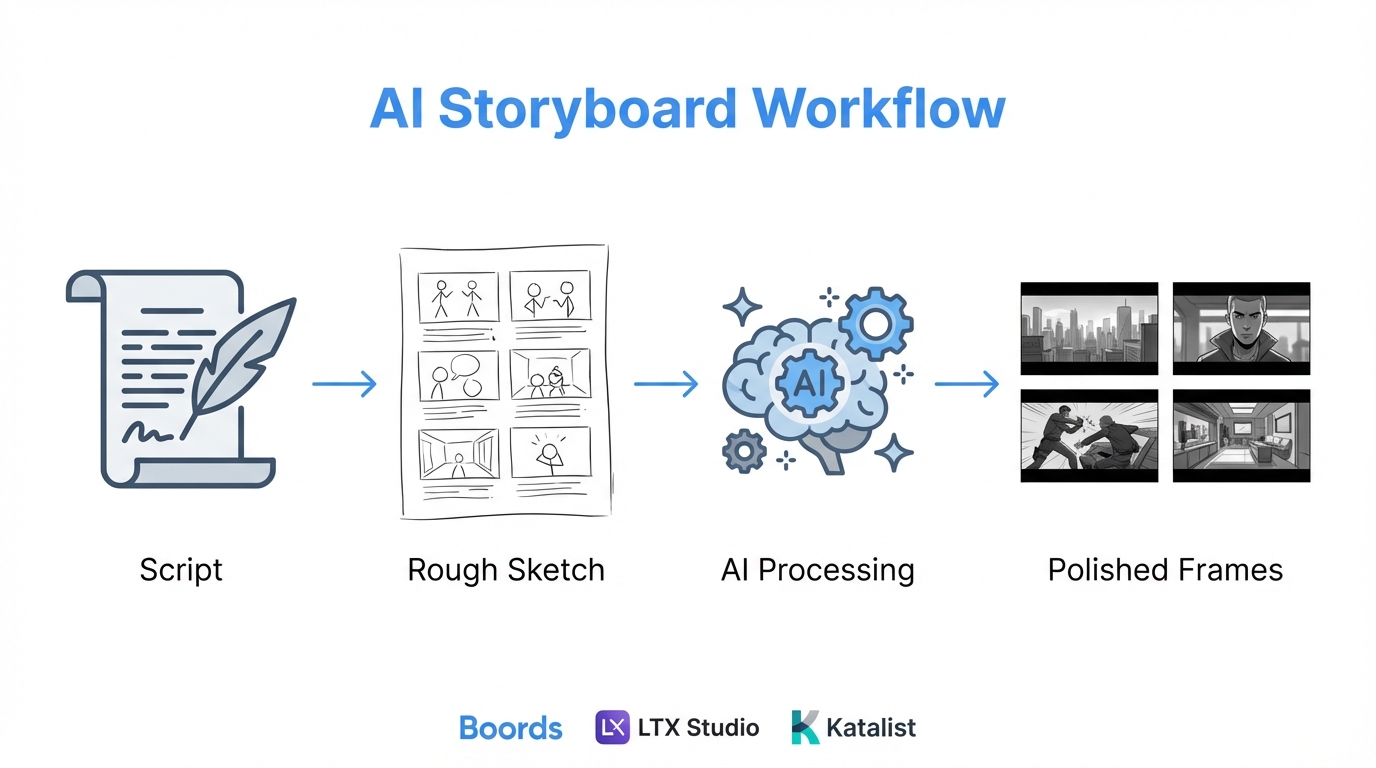
A new generation of AI storyboarding tools has emerged that transforms this phase. Boords turns scripts into client-ready storyboards in minutes—paste your script, and it generates visual frames for each scene. LTX Studio goes further: you can sketch rough compositions, write text prompts, or upload reference images, and the AI fills in the details. Adobe Firefly’s storyboard generator converts scene descriptions into dynamic storyboard images that capture tone, setting, and pacing.
The most interesting capability is sketch-to-image refinement. StoryboarderAI lets you draw rough compositions—stick figures, basic shapes, scribbled layouts—and the AI transforms them into polished storyboard frames while preserving your intended composition. Your sketch stays a sketch, but better drawn. This preserves the creator’s vision while eliminating the gap between imagination and visual representation.
Katalist maintains character consistency across entire storyboards, solving the problem of characters looking different from frame to frame. Higgsfield Popcorn even exports directly to Sora 2 for video generation, bridging storyboarding and animation.
Character Illustration: From Description to Character Sheet
Every video needs characters, and each character needs multiple poses, expressions, and angles. For a historical documentary, you might need a king, queen, advisors, servants—all in period-accurate clothing, all visually consistent.
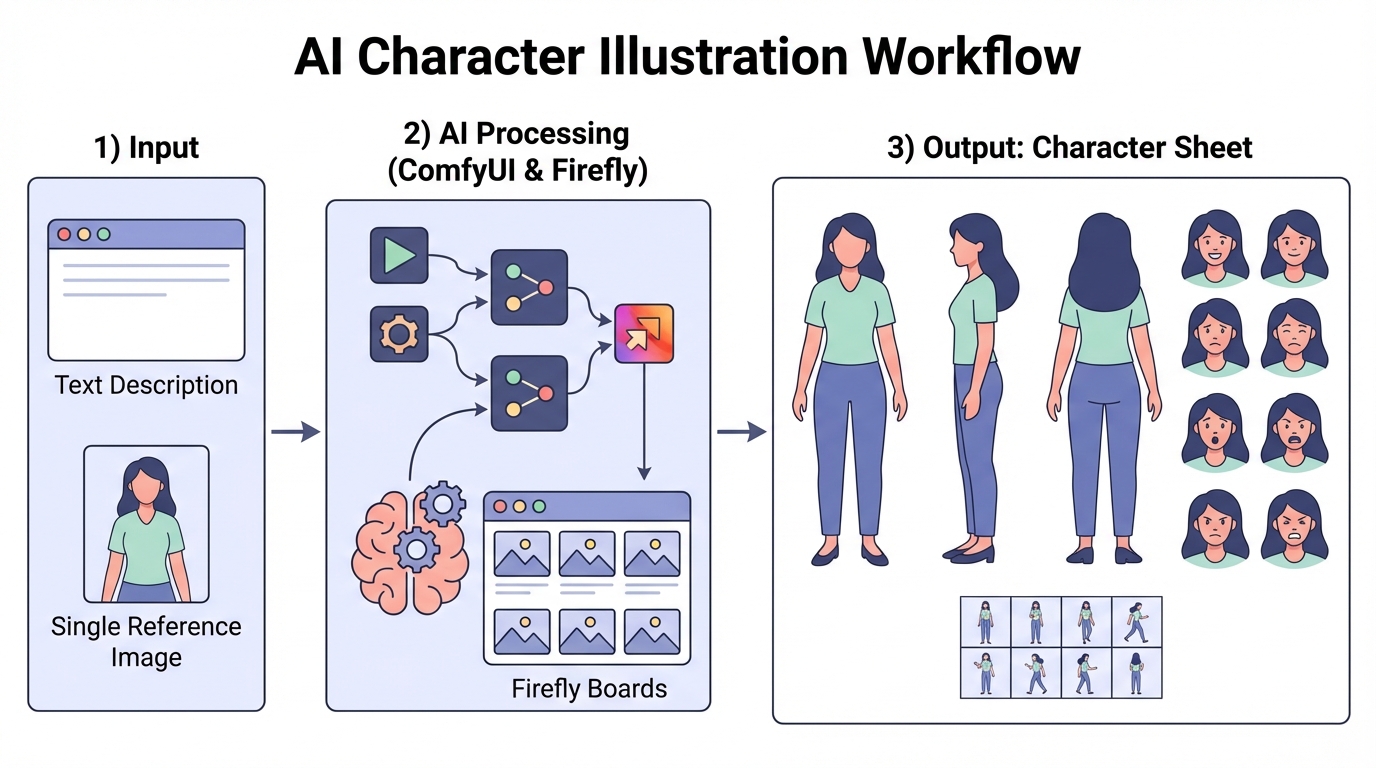
ComfyUI workflows have become the standard for consistent character generation. The Consistent Character Creator 3.0 pipeline solves the biggest challenge in AI art: keeping a character’s identity consistent across multiple images. From a single input image or description, it generates front, side, and back views, emotional expressions, turntable rotations, and scene variations—all while maintaining structural fidelity.
The Visual Novel Character Creation Suite (VNCCS) specializes in creating character sprites with consistent appearance across all images. The SpriteSheetMaker workflow produces 40 sprites in a single sheet—perfect for animation assets.
For ideation, Adobe Firefly Boards provides an infinite canvas for character design exploration. It integrates models from Runway, Luma AI, Google, and Pika, letting you explore character variations, costume options, and style directions rapidly. Upload a reference image of a historical portrait, and generate character design variations that maintain the period aesthetic.
Photo-to-pose extraction is particularly useful: feed the workflow a reference photo of someone in a specific pose, and it extracts that pose for your illustrated character. This bridges real-world reference and stylized output.
Animation: From Still to Motion
Animation is the most labor-intensive phase. Keyframing every movement, rigging characters, managing in-betweens, rendering sequences—this is where weeks disappear.
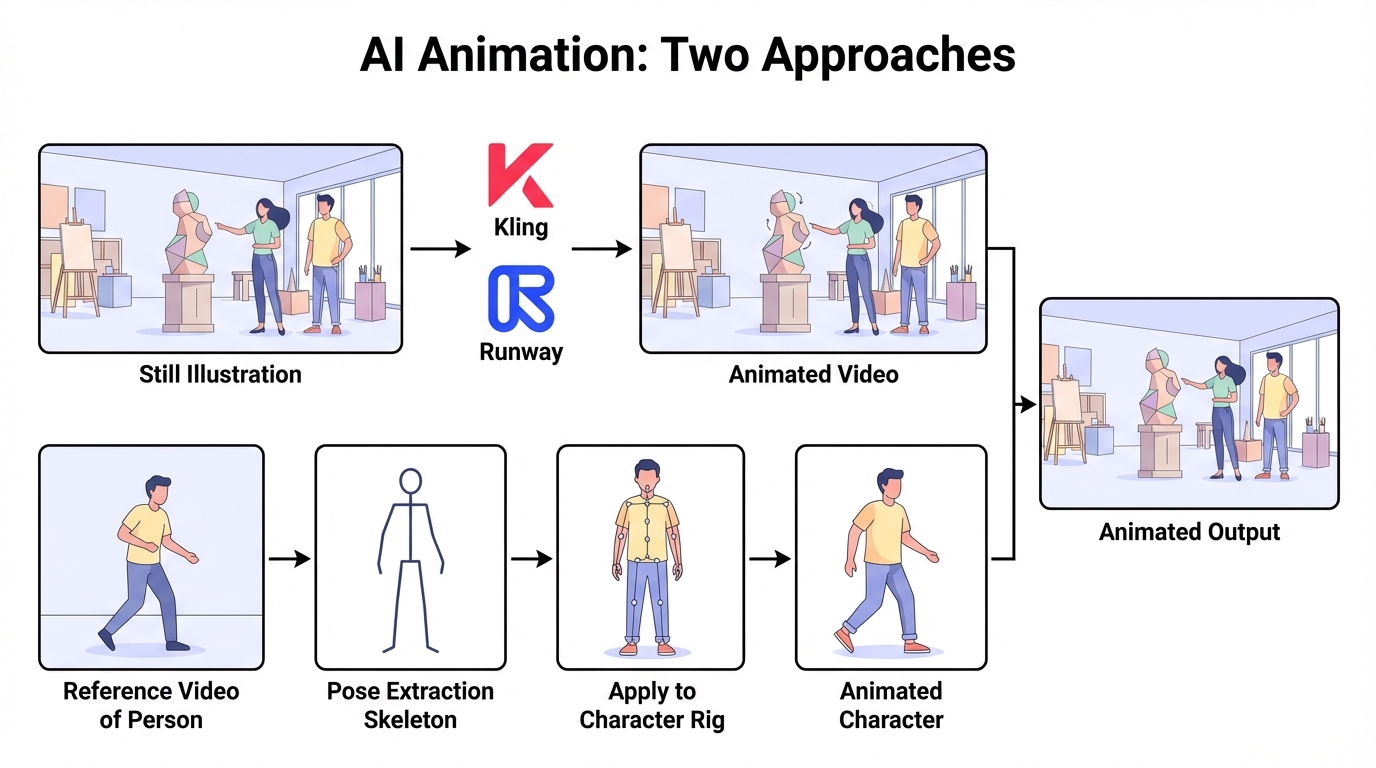
Two distinct approaches have emerged:
Approach 1: Image-to-Video Generation
Take a still illustration and let AI animate it directly. Kling v2.6 excels at this, with Motion Control that uses skeletal extraction to retarget movements from a reference video onto your character. Record yourself performing an action, and Kling transfers that performance onto your illustrated character with frame-accurate precision. The physics simulation handles secondary motion—hair flutter, cloth ripple—naturally.
Runway Gen-4 prioritizes character consistency, maintaining appearance, clothing, and proportions across different shots. According to comparative analysis, the consensus is: Kling for motion realism and physics, Runway for character consistency and professional workflows. Many creators use both.
Approach 2: Pose-to-Rig Transfer
Extract pose data from any video—a film clip, a dance tutorial, yourself acting out a scene—and apply that motion to a rigged character. This bypasses tedious keyframing entirely. ComfyUI workflows combine OpenPose extraction with character rigs, mapping joints and movements directly to your assets.
For optimal results: use high-quality footage (30fps+) with clear lighting, keep all limbs visible, and use tripod-stabilized clips to avoid inherited camera jitter.
The creator becomes a director rather than an animator. Instead of manually positioning limbs frame by frame, you perform the action you want and let AI translate it to your characters.
Audio & Lip Sync: From Voice to Character
Recording narration is only half the audio challenge. Syncing lip movements to speech requires keyframing mouth shapes for every syllable—tedious work that scales linearly with video length.
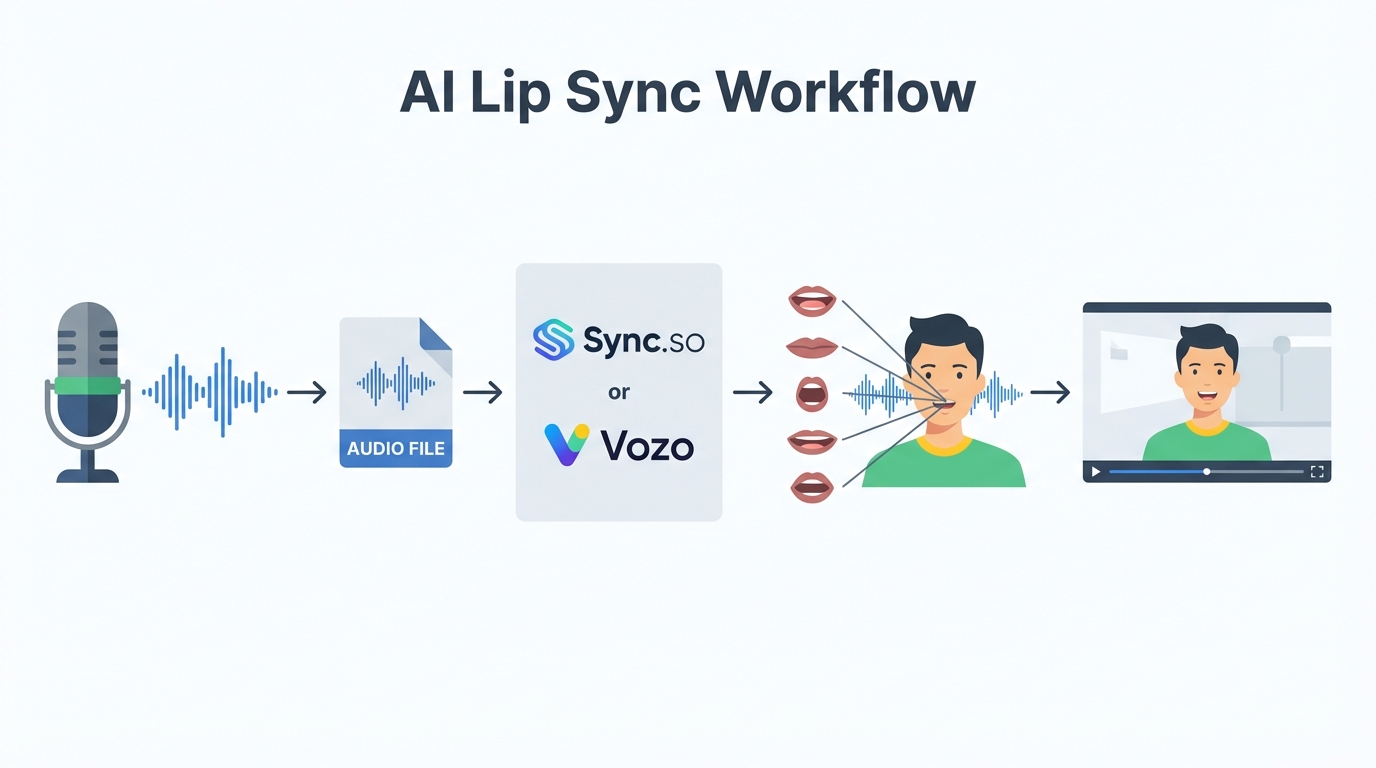
AI lip sync has evolved dramatically. Sync.so, from the Wav2Lip founders, can learn a speaker’s unique style and apply it to animated characters in up to 4K resolution—no training required. LipSync.video uses algorithms to sync 2D/3D character mouths with voice tracks, creating animations for series, game cutscenes, or shorts.
Vozo AI represents the next generation beyond GAN-based solutions, with significantly enhanced quality and realism. Magic Hour offers free AI lip sync that matches mouth shapes to audio automatically. Dzine AI specifically targets animators and game developers, adding professional-grade synchronization to 2D or 3D characters.
The workflow becomes: record your narration → pass audio to lip sync tool → receive character mouth animations → composite into your video. What previously took hours per minute of footage now takes minutes.
Motion Design: From Prompt to Code to Video
Motion graphics—title cards, lower thirds, animated diagrams, transitions—require either manual After Effects work or template customization. Each video needs custom motion design that matches its content.
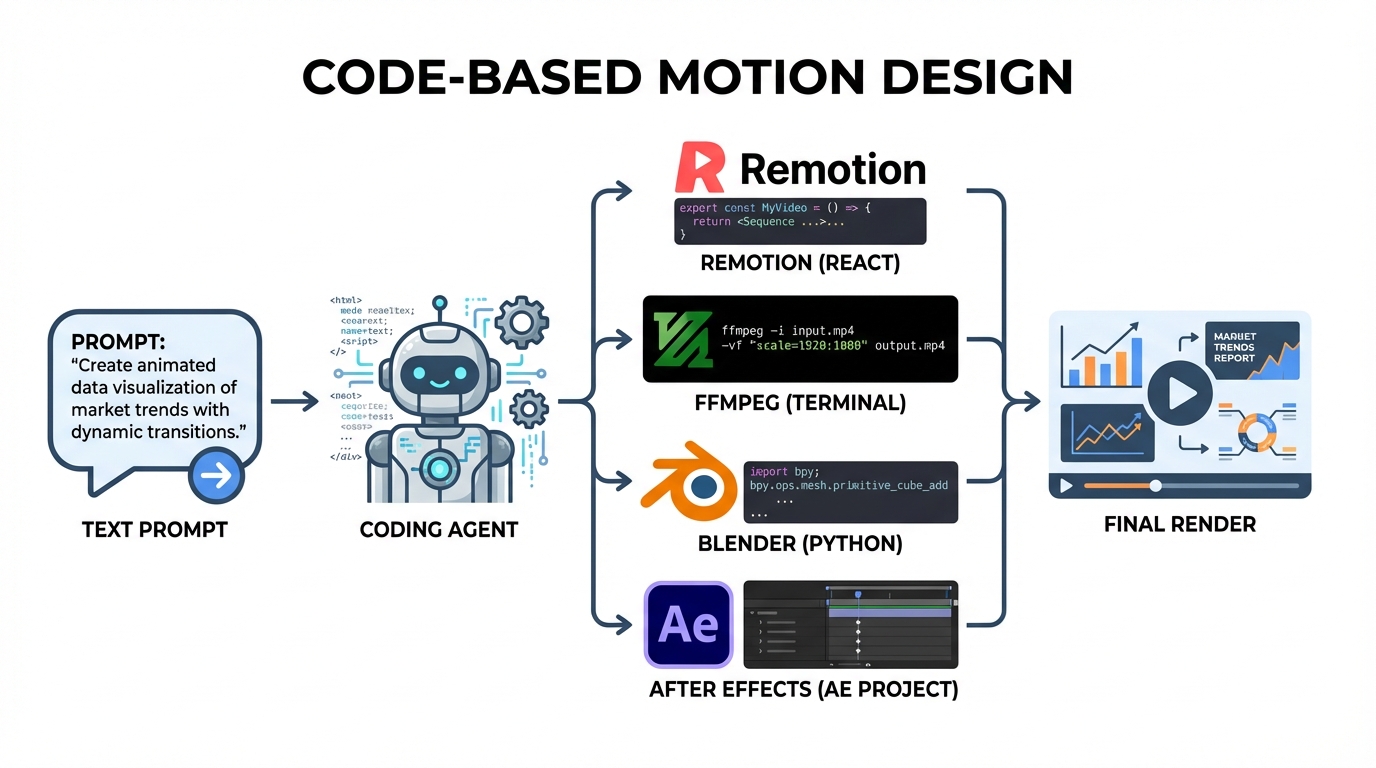
The breakthrough is using a coding agent to generate motion graphics from natural language descriptions. Describe what you want, and the agent writes the code—you just render it.
Multiple output paths exist:
- Remotion — A React framework that renders real MP4 videos. Write components, get video. The prompt-to-motion-graphics template shows the workflow: describe → generate code → render.
- FFmpeg — For simpler compositions, a coding agent can generate FFmpeg filter chains that composite images, add text overlays, and create transitions directly from the command line.
- Blender Python — For 3D motion graphics, agents can generate Python scripts that create and animate objects in Blender, then render to video.
- After Effects scripting — Agents can generate ExtendScript or the newer Bolt CEP templates that create After Effects projects programmatically—useful when you need the full AE toolset.
This approach excels at:
- Animated diagrams — Describe “a flowchart showing medieval book production steps, each appearing sequentially,” and get working code
- Data visualizations — “Bar chart showing manuscript production by monastery, animated to grow from zero”
- Title sequences — “Medieval-style title card with illuminated letters that draw themselves”
- Transitions — Custom transitions that match your video’s aesthetic
The code-based approach means every motion graphic is parametric and repeatable. Change the data, re-render. Change the style, update a few lines. The motion design phase becomes specification rather than manual construction.
The New Possible Workflow
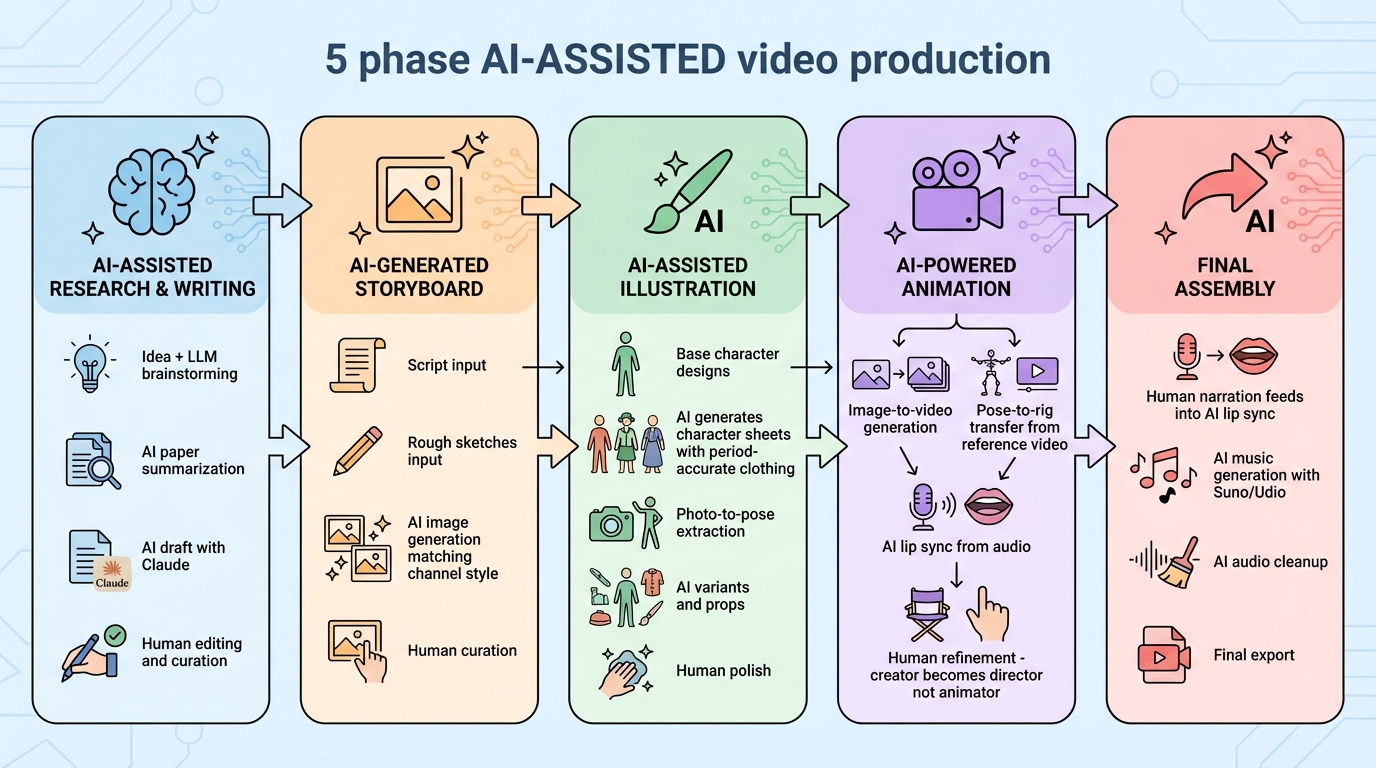
With AI tools integrated, the workflow shifts from manual production to human-guided curation: scripts become storyboard frames automatically, rough sketches become polished compositions, character descriptions become consistent character sheets, performance videos become character animations, and narration becomes lip-synced character speech.
The Reality Check: What Can Go Wrong
However, this gain in productivity comes at a cost:
Historical inaccuracy: Image generators hallucinate details. A “12th-century monk” might have a 15th-century habit, anachronistic architecture, or entirely invented manuscripts. Every generated asset needs a very detailed prompt and fact-checking against period references.
Style drift: Even with consistent character workflows, faces shift between frames, clothing details change, and proportions wander. You’ll spend time fixing inconsistencies that manual illustration wouldn’t have introduced.
Uncanny motion: AI animation often produces movements that look almost right but feel wrong—unnatural weight distribution, impossible joint angles, or expressions that don’t match the action. The “AI tells” are visible to trained eyes.
Cost accumulation: API calls, subscriptions, and compute time add up. A “free” workflow using multiple tools can cost more than traditional methods once you account for generation attempts, re-dos, and premium tiers needed for quality output.
Time spent fixing: The promise is “generate in seconds,” but the reality is “generate in seconds, fix for hours.” AI output is a starting point, not a finished product. The mechanical labor shifts from creation to curation and correction.
Dependency on external services: When Kling changes its model, your workflow breaks. When a ComfyUI node gets deprecated, your pipeline needs rebuilding. Traditional tools are stable; AI tools are moving targets.
The honest assessment: AI reduces some mechanical labor but introduces new categories of work. It’s a different workflow, not necessarily a faster one—until you learn what the tools actually do well versus what they promise.
Putting It to the Test: The Life of a Medieval Scribe
Theory is one thing. Execution is another. To validate whether this AI-amplified workflow actually works, I’m going to attempt something concrete: create a 1-minute animated educational video using this exact pipeline.
The topic: “The Life of a Medieval Scribe”—a day in the life of someone who spent their days copying manuscripts in a monastery scriptorium. It’s historically specific (good for period-accurate costumes and settings), visually interesting (writing, illumination, monastic life), and narrow enough for a 60-second format.
This will be the subject of the next post: a full walkthrough of creating a short animated documentary using the AI-assisted workflow described above. The goal isn’t to prove AI can replace human creativity—it’s to see how much friction can be removed while keeping the creator in control.
Next up: I’ll put this workflow to the test by creating “The Life of a Medieval Scribe”—a 1-minute animated video built entirely with AI assistance. Stay tuned.
Tools Reference
| Phase | Tool | Purpose |
|---|---|---|
| Research | Wikipedia, Google Scholar, JSTOR | Source discovery |
| Research | Kindle + clippings.io | Highlight extraction |
| Writing | Google Docs | Script writing |
| Writing | Hemingway Editor | Clarity editing |
| Storyboard | Storyboarder | Visual planning |
| Reference | PureRef | Inspiration collection |
| Audio | Shure SM57 + Focusrite 2i2 | Recording |
| Audio | Adobe Audition | Audio editing |
| Illustration | Adobe Illustrator | Vector graphics |
| Photo Edit | Adobe Photoshop | Image manipulation |
| Animation | Adobe After Effects | Motion graphics |
| Animation | Limber plugin | Character rigging |
| Animation | GeoLayers plugin | Map animations |
| Editing | Adobe Premiere Pro | Video editing |
| Music | Epidemic Sound | Licensed music |
Inspired by Cogito’s workflow breakdown