From Diagram to Video; Building drawMotion

A Thirty-Second Sketch Defines the Whole Pipeline
In my previous post, I argued that a whiteboard, combined with voice and AI, could replace the translation layer between creative intent and structured computer input. The core idea: rough sketches carry enough structural information (sequence, branching, dependencies) that an AI can interpret them and generate working software. That post was a thesis. This one is about the first experiment.
I wanted to take a still image, isolate a subject, animate it, reconstruct the background, and render the whole thing as an MP4. So I started where the thesis said to start: I drew a diagram.
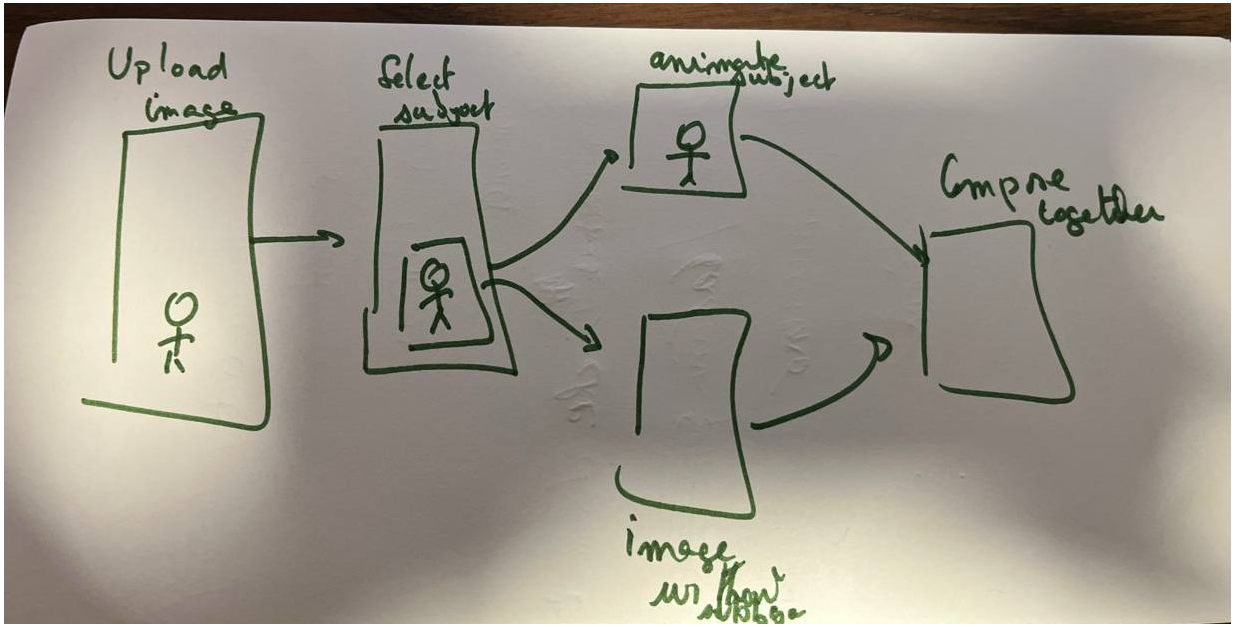
Green marker on a whiteboard, five boxes connected by arrows. Upload Image. Select Subject. Animate Subject. Inpaint Background. Compose Together. Thirty seconds of drawing, and the pipeline was defined.
The Diagram Becomes a UI That Collects What the Code Needs

Each box in the sketch became a step in the UI that collects exactly the human inputs that step requires.
Upload: drag and drop an image.
Select Subject: draw a rectangle on the image to mark what you want to animate. rembg extracts the subject, producing a transparent cutout and a mask.
Animate: choose which property to animate (scale, rotation, translation), the start and end values, duration, easing curve, whether it loops. You can stack multiple animations. The frontend shows a live preview using the same easing math the renderer uses.
Inpaint Background: pick a solid color from the image, or write a prompt and let OpenAI’s image model fill in what was behind the subject.
Render: set FPS, duration, format. The engine composites every frame and encodes it as a GIF or MP4.
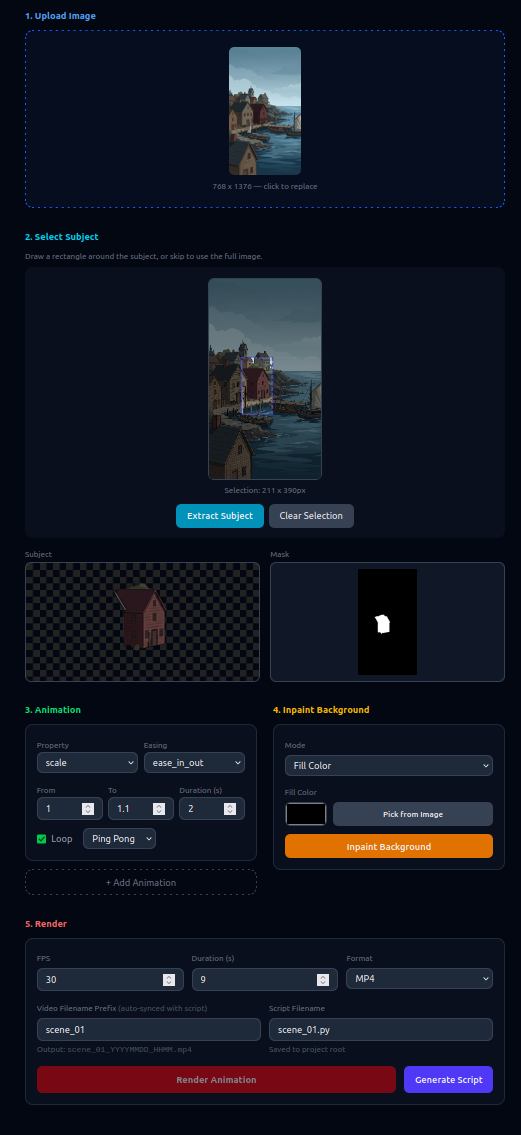
The UI’s only job is collecting the precise attributes needed to produce a final script. The pipeline diagram from the whiteboard is rendered as an interactive SVG at the top of the page. Click a step and it scrolls you there, completed steps get checkmarks. The sketch became the navigation.
The UI Produces a Script That Assembles Four Python Modules
Once the frontend has collected all the inputs, it generates a standalone Python script, a complete runnable program that encodes every decision you made:
#!/usr/bin/env python3
from pathlib import Path
from PIL import Image
from drawmotion.extract import extract_subject
from drawmotion.inpaint import inpaint_background
from drawmotion.render import render_animation
from drawmotion.types import Region, AnimationParams, RenderConfig

# --- Human inputs (collected by the UI) ---
INPUT_IMAGE = Path(__file__).parent / "uploads/images/81076d03.png"
REGION = Region(x=32.1, y=622.4, w=1458.6, h=1623.7)
ANIMATION = [
    AnimationParams(property="scale", from_value=1.0, to_value=1.1,
                    duration=2.0, easing="ease_in_out",
                    loop=True, loop_mode="ping_pong"),
]
INPAINT_KWARGS = dict(mode="fill_color", fill_color="#5a574e")
RENDER_CONFIG = RenderConfig(fps=30, duration=9.0, format="mp4")

# --- Pipeline ---
image = Image.open(INPUT_IMAGE)
result = extract_subject(image, REGION)
background = inpaint_background(image, result.mask, **INPAINT_KWARGS)
output = render_animation(background, result.subject, ANIMATION,
                          RENDER_CONFIG, region=result.region)
print(f"Saved to {output}")
Human inputs at the top, pipeline at the bottom. You can run it standalone, modify it, version-control it, hand it to someone who never opened the UI. The frontend is disposable; the script is the artifact.
The script is an assembly of four Python modules, each handling one concern: extract.py removes the subject from the background via rembg, inpaint.py reconstructs the hole with a solid color or an OpenAI-generated fill, animate.py computes scale/rotation/translation values at any point in time using standard easing functions, and render.py composites each frame and encodes the result as GIF or MP4. The script wires these four modules together with the specific parameters the UI collected. That’s all it does.
I chose to generate a .py file and run it myself, but nothing would prevent the server from executing the script directly and returning the rendered video as a download. The separation is the same either way: the UI collects parameters, the script encodes them, the engine runs them.
A Whiteboard Sketch Replaces a Node Editor
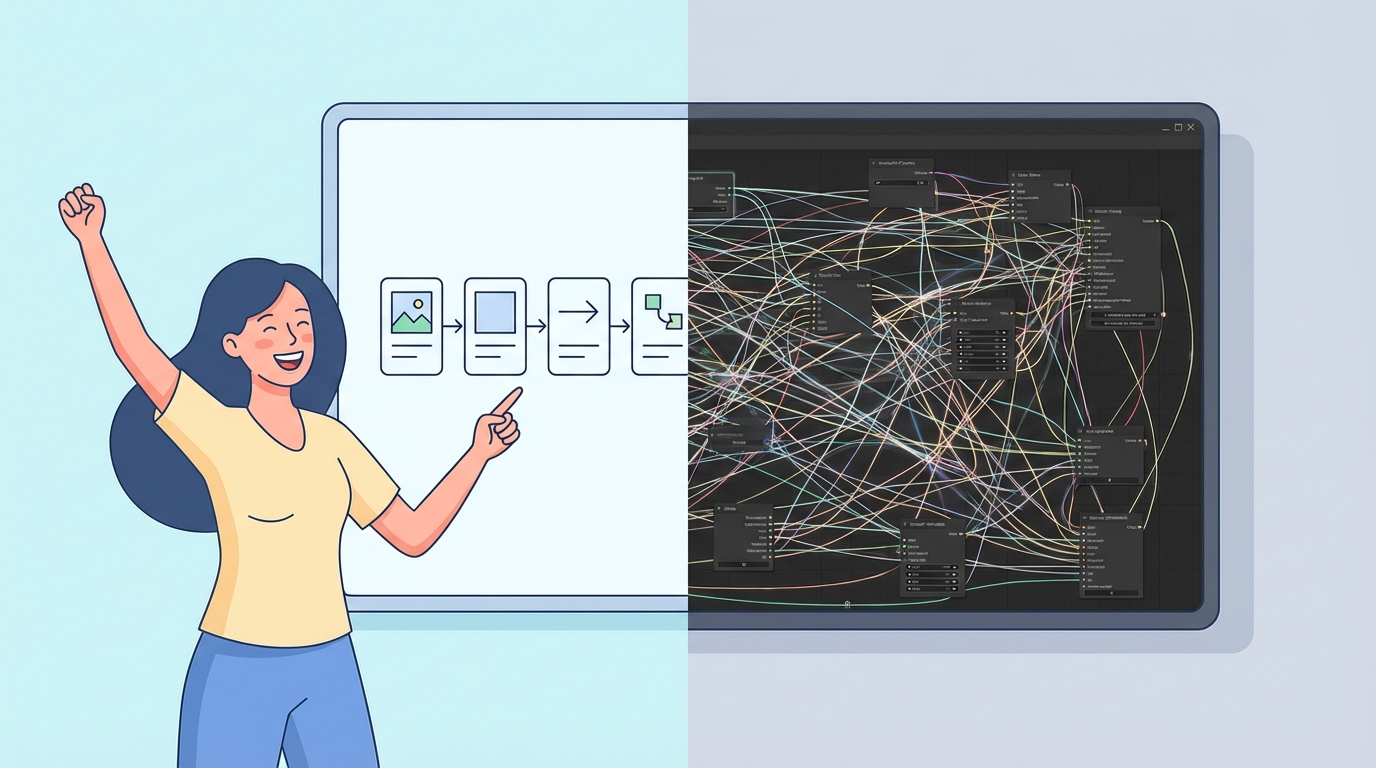
The whole codebase, frontend and backend, was built by showing Claude Code the diagram. I drew the flow, the LLM generated the specific tool for that flow and the Python code to execute it.
This is the opposite of the ComfyUI approach. ComfyUI and tools like it belong to the old paradigm: build a general-purpose node-based editor, implement every possible node type, create a backend that can execute arbitrary graphs. That’s a massive amount of complexity upfront, designed to serve everyone’s needs before serving anyone’s.
Here, you draw the flow you need and an LLM creates a specific tool for that flow. The real modules are the Python files. The drawn diagram lets you compose them without a full-blown 2D graph editor and a backend capable of executing any arbitrary flow. Less infrastructure, less abstraction, less complexity.
The question is what happens when you need more complexity. I think the complexity will grow toward your specific needs rather than trying to be a solution for everyone from the start. That narrowness is a feature: it means reaching your goal and creating the motion is much easier. And when the next project needs a different pipeline, you draw a different diagram. A whiteboard sketch plus an LLM replaces a node editor plus a general-purpose execution engine.